
• Ngena
  • Bhalisa
  • Ukhohlwe iphasiwedi
  • MZN
  • Afrikaans
  • Amharic
  • العربية
  • Azerbaijani
  • Bambara
  • Bci
  • Beja
  • Bemba
  • Català
  • Nyanja
  • 中文
  • Pov
  • Hrvatski
  • Čeština
  • Dansk
  • Dinka
  • Nederlands
  • English
  • Estonian
  • Ewe
  • Ewondo
  • Fang
  • Persian
  • Fon
  • Cri
  • Français
  • Deutsch
  • Hausa
  • עברית
  • Magyar
  • South Ndebele
  • Xhosa
  • Zulu
  • Italiano
  • Kinyarwanda
  • Rundi
  • Ktu
  • Kpelle
  • Krio
  • Kabuverdianu
  • Lingala
  • Ganda
  • Macedonian
  • Vmw
  • Malagasy
  • Mnk
  • Mossi
  • Morisyen
  • Jbn
  • Norwegian
  • Kuanyama
  • Português
  • Português
  • Fuf
  • Română
  • Русский
  • Aec
  • Sango
  • Ngambay
  • Northern Sotho
  • Crs
  • Southern Sotho
  • Tswana
  • Shy
  • Zdj
  • Shona
  • Swati
  • Somali
  • Español
  • Swahili
  • Svenska
  • Central Atlas Tamazight
  • Tigrinya
  • Venda
  • Türkçe
  • Twi
  • Українська
  • Umbundu
  • Wolof
  • Tsonga
talk to us on WhatsApp now
EzVerso
Ngena
  • EzVerso
  • Domain
    • Register A Domain
    • Transfer Your Domain
  • Web Hosting
  • Reseller
  • Email Hosting
  • Infrastructure
    • Virtual Private Server
    • Virtual Dedicated Server
Ngena

Umtapo Wolwazi

  1. Ikhaya Lephothali
  2. Umtapo Wolwazi
  3. Two-Factor Authentication
  4. How to setup Authentication

  Izigaba

54
API
62
AppStore
25
Client Area
145
Compute
2
Databases
810
Hosting
62
Others
5
Partnerships
5
Storage
1
Web development and hosting management

  Izigaba

  Ifu Lamathegi

2FA API Backup ceph client create database DirectAdmin Docker Registry Domain Email hosting How to add a subdomain How to Install an SSL Certificate (AutoSSL) in CWP How to remove a subdomain How to Search for a Knowledge Base Article How to View Your Domain’s WHOIS Information How to View Your Server Task History Let’s Encrypt Login MariaDB MySQL Non Linux S3 client Partner hub partnerhub PhpMyAdmin Proxmox reseller RocksDB S3 S3 Client S3 mobile client setup Storage subdomain Ubuntu Ubuntu 24.04 VM wordpress

  Usizo

  Amathikithi Ami Osizo   Izimemezelo   Umtapo Wolwazi   Okokulanda   Isimo Senethiwekhi   Vula Ithikithi

How to setup Authentication Print

  • 0

HOW TO SETUP AUTHENTICATOR


Download the authenticator mobile application. You need to install either the Google Authenticator or Authyapplication on your phone.
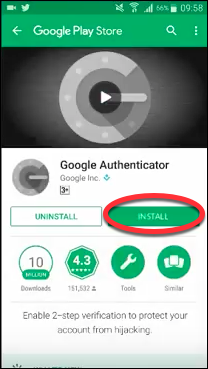

login5

Download links:

  • Google Authenticator for Android

  • Google Authenticator for iOS

  • Authy for Android

  • Authy for iOS 


Ingabe le mpendulo ibe usizo?
Back

Iyalayisha...
Iyalayisha...

Generate Password

Please enter a number between 8 and 64 for the password length
Clock
24 x 7 Usekelo Lwekhasimende
Clock
99% Isiqiniseko Sesikhathi Sokuphumula
Clock
400+ Amasistimu Nezinhlelo Zokusebenza Zamahhala
Clock
Isiqinisekiso sokubuyiselwa imali sezinsuku ezingama-30
EzVerso

8° Bairro, Macurrungo

Inkampani
  • Singobani
  • Amahora okuvula
Okusemthethweni
  • Inqubomgomo yobumfihlo
  • Imigomo Yesevisi
Ukusekela
  • Isisekelo solwazi
  • Yabelana ngemibono yakho
Xhumana nathi
  • WhatsApp / Phone : +258 86 163 8401
  • Email Support : help@ezverso.com
Ilungelo Lobunikazi © 2026 EzVerso. Wonke Amalungelo Agodliwe.
payment
Stay connected :